Ticket Triage Ticket Data Analysis
 Security and navigation
PERMISSIONS Security level with Admin Feature Access permission to Kaseya Intelligence.
NAVIGATION Left Navigation Menu > Admin > Admin Categories > Automation > Kaseya Intelligence > Kaseya Intelligence Settings > Ticket Triage
NAVIGATION Left Navigation Menu > Admin > Commonly Used > Kaseya Intelligence > Ticket Triage
Overview
When you enable Ticket Data Analysis for Ticket Triage, Autotask begins analyzing your existing historical tickets in the background. This initial analysis period is required before Ticket Triage can confidently suggest primary resources and other fields for new tickets.
During this initial period, you may notice that:
-
Ticket Triage suggestions are missing, incomplete, or less accurate, and
-
Automation based on suggested resources does not behave as expected.
This is normal and expected while your historical data is being processed.
Why this matters
Ticket Triage learns from your own ticket history. It looks at:
-
Which technicians resolved which types of tickets,
-
How long different issues took to resolve (average handle time, mean time to resolution, SLA performance),
-
The skills implied by ticket notes and time entries.
If you enable automation (for example, workflow rules that auto‑assign a Primary Resource) before this initial learning period has finished, you risk:
-
Incorrect or missing resource suggestions on early tickets,
-
Automation assigning tickets to the wrong resource or queue,
-
Teams assuming Ticket Triage is misconfigured or “not working.”
By understanding the initial analysis period and waiting for it to complete, you:
-
Set correct expectations with your technicians and coordinators,
-
Avoid unnecessary troubleshooting and configuration changes,
-
Turn on automation only after the AI has a strong, data‑backed foundation.
How Ticket Data Analysis works
When analysis starts
Ticket analysis begins when an admin:
-
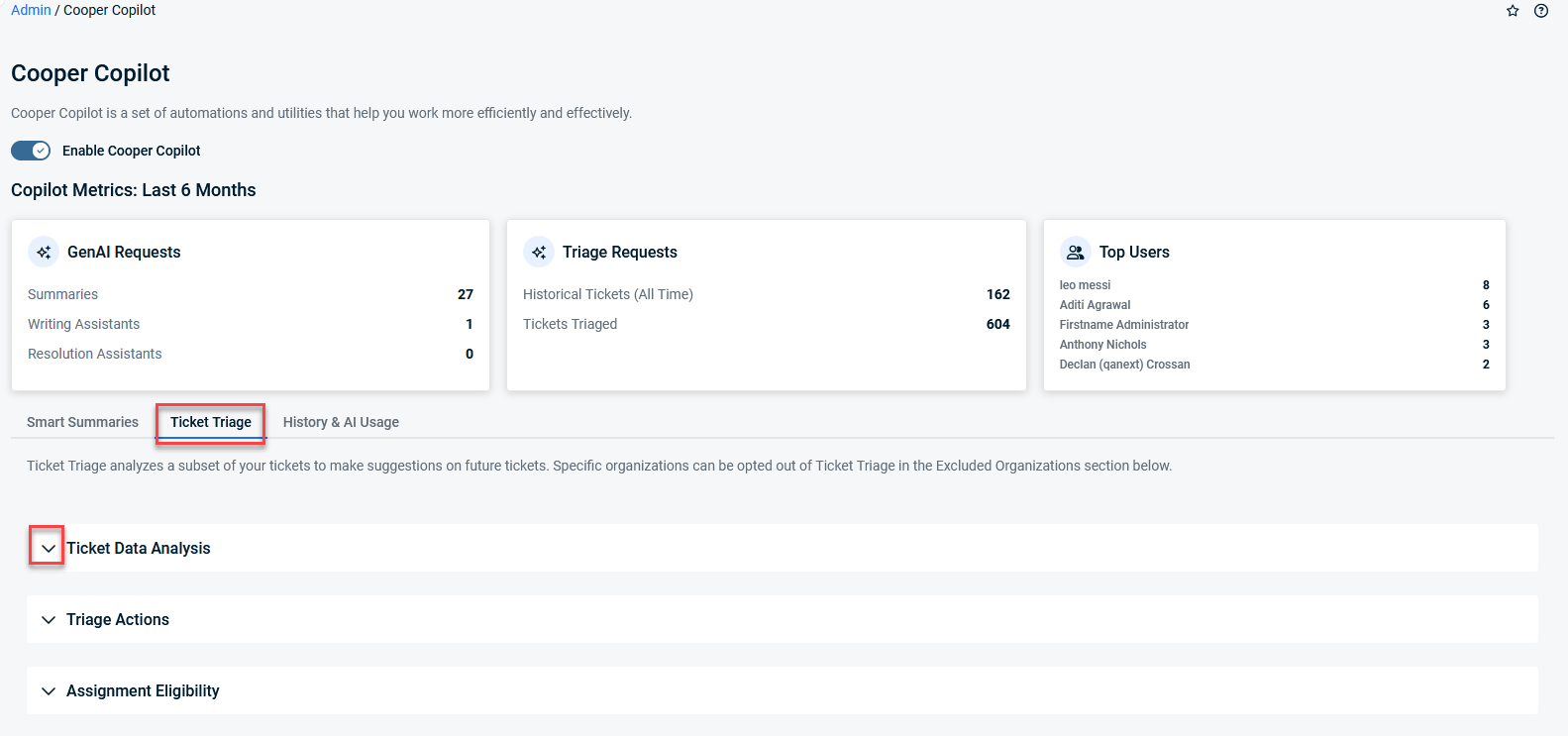
Goes to Left Navigation Menu > Admin > Admin Categories > Automation > Kaseya Intelligence > Kaseya Intelligence Settings > Ticket Triage,
-
Expands Ticket Data Analysis, configures statuses/queues/ticket categories and analysis period, and
-
Clicks Save.
At that point:
-
Existing/historical tickets that match your filters are queued for background analysis.
-
The system uses these tickets to:
-
Infer resource skills and performance patterns,
-
Calculate triage‑related KPIs,
-
Learn which resources are a good fit for specific types of work.
-
Background processing and nightly skill analysis
Ticket Data Analysis is not a one‑time, instant calculation:
-
Historical ticket analysis runs in the background and may take hours or days, depending on:
-
How many months of history you selected,
-
How many statuses, queues, and ticket categories you included,
-
The total number of tickets that meet those criteria.
-
-
Skill extraction (turning ticket content into skills for resources) runs on a nightly schedule.
Until that nightly processing completes, resource suggestions will be limited or less accurate.
What to expect during the intial analysis period
Initial analysis period
When you save Ticket Data Analysis settings:
-
The system starts analyzing existing/historical tickets that match your configuration.
-
This process runs entirely in the background.
-
The system does not generate immediate, full‑quality suggestions.
-
Analysis duration depends on ticket volume:
-
Smaller datasets may complete in less than a day.
-
Large environments (for example, tens of thousands of tickets) can take multiple days.
-
You should expect data quality to improve gradually, not all at once.
Why resource suggestions may be missing at first
In the early stages, you may see:
-
No suggested Primary Resource, even though Ticket Triage is enabled,
-
Suggestions that feel generic, incomplete, or less accurate than expected.
This is because:
-
Resource suggestions depend on both:
-
Historical ticket analysis, and
-
The Skill extraction agent that runs on nightly schedules.
-
-
Until both processes have run against enough of your data:
-
Suggestions may be empty,
-
Suggestions may be incomplete,
-
Confidence is lower, which reduces the number of suggestions surfaced.
-
This behavior is expected in the first 24–48 hours after enabling Ticket Data Analysis and can last longer for very large data sets.
How results improve over time
You can think of improvement in phases:
-
Day 1
-
Historical analysis has just begun.
-
Many tickets have not yet been processed.
-
Resource suggestions may be minimal or unavailable.
-
-
Day 2 and onward
-
More historical tickets have been analyzed.
-
Nightly skill extraction has run at least once.
-
Noticeable improvement in the number and relevance of suggestions.
-
-
After multiple days
-
A large portion of your historical dataset has been processed.
-
Skill inference and performance patterns are much better established.
-
Suggestions continue to refine and stabilize as more tickets are included.
-
Over time, as ticket volumes grow and more history is analyzed, Ticket Triage becomes more accurate and consistent for your environment.
Guidance for workflow rules and automation
Create workflow rules in “inactive” mode first
You can safely design and configure workflow rules that use Ticket Triage while the initial analysis is running. We recommend:
-
Create rules as Inactive at first:
-
Define when Ticket Triage should run,
-
Configure which fields to suggest or auto‑apply (including Primary Resource),
-
Save the rules without activating them.
-
Wait before activating automation based on suggested resources
To avoid premature automation:
-
Do not immediately enable rules that:
-
Auto‑assign Primary Resource, or
-
Rely heavily on Ticket Triage suggestions to drive routing decisions.
-
Instead:
-
Allow multiple days for Ticket Data Analysis to run and for skills to be extracted.
-
During this time, monitor suggestions manually:
-
Review who is being suggested for which tickets,
-
Confirm the suggestions match your expectations.
-
-
Once suggestions look stable and accurate:
-
Gradually activate workflow rules that use Ticket Triage,
-
Start with less critical queues or categories, then expand.
-
In the interim, you can safely rely on other suggested fields (such as Priority, Issue, Sub‑Issue, and Queue) even while resource suggestions are still improving.
No progress indicator or percentage complete
Currently, Ticket Triage does not display:
-
A percentage complete for ticket analysis,
-
A remaining time estimate for when processing will finish.
Instead:
-
Analysis runs in the background according to your configuration and ticket volume.
-
You can infer that the initial analysis is largely complete when:
-
Resource suggestions become more frequent, and
-
Suggestion quality feels consistent across typical tickets.
-
Because there is no explicit progress bar or ETA, it is important to:
-
Plan for an initial analysis window of at least 24–48 hours, and
-
Avoid making go/no‑go decisions on Ticket Triage based solely on the first few hours of usage.
Best practices summary
To get the best experience from Ticket Triage Ticket Data Analysis:
-
Expect a ramp‑up period
Give the system time to analyze historical tickets—especially in large environments.
-
Don’t assume misconfiguration too early
Missing or weak suggestions in the first days are usually a sign that analysis is still in progress, not that something is broken.
-
Delay critical automation
Design your workflow rules early, but keep them inactive until suggestions are stable and trustworthy.
-
Avoid rapid configuration churn
Large, frequent changes to Ticket Data Analysis settings will repeatedly re‑queue data and extend the time required for suggestions to stabilize.


